


AI accounting software can make short work of invoice coding, payment matching, and other routine finance tasks. But a suggested answer isn't necessarily the right one.
Say a customer has two outstanding invoices for the same amount. The software suggests matching an incoming payment to one of them. It looks straightforward until you check the payment reference and realise the customer was paying the other invoice.
It's a small example, but it explains why finance teams need to think carefully about how they use AI.
In AccountsIQ's CFO AI Paradox research, 82% of finance leaders said they felt pressured to adopt AI faster than they were comfortable with, despite 81% fully or mostly trusting AI-driven outputs.
The appetite for AI is there. The harder question is deciding which tasks it can handle reliably, where someone still needs to check the work, and how to spot mistakes before they affect the accounts.
This guide looks at what AI accounting software can do, how to use it sensibly, and what finance teams should look for when comparing platforms.

What is AI accounting software?
AI accounting software uses artificial intelligence to help finance teams prepare, process, and analyse financial information.
It can recognise patterns in transactions, suggest where to record costs, propose payment matches, and flag items that need attention.
Some AI features are built into accounting platforms, while others are available through separate tools.
It's also worth understanding the difference between AI and traditional accounting automation.
- Accounting automation follows rules you've already set. For example, an invoice above £5,000 might automatically go to the finance director for approval.
- AI accounting software can use information from previous transactions, invoice details, and other records to suggest an action. It might recommend a particular cost code because similar invoices have been recorded there before.
Both have their uses. The distinction matters because a rule following a clear instruction is different from AI making a recommendation that may need checking.
💡 For more on traditional automation, read our guide to accounting automation.
The main types of AI accounting software
There are three common approaches:
- AI built into accounting software: Features that help with tasks inside your existing finance system, such as preparing entries or reviewing transactions.
- Specialist AI tools: Separate applications designed for particular jobs, such as invoice processing or expense checks.
- General-purpose AI assistants: Tools such as ChatGPT that can help explain information, analyse data, and draft financial commentary, but don't replace a dedicated accounting system.
Some newer platforms are also designed around AI from the outset.
When comparing options, it's more useful to look at what the software can actually do than how it's described. In particular, consider whether it works with your existing accounting records, approval processes, and reporting needs.
What can AI accounting software actually do?
The clearest opportunities are often the tasks finance teams repeat every day.
Invoice processing, transaction coding, and payment matching all involve information that follows recognisable patterns. AI can help prepare this work, leaving the finance team to deal with anything unusual.
Here's where it can help, and what still needs checking.
Not every feature in this table uses AI. Some are handled through existing accounting rules or integrations, and capabilities vary between products.
The important thing is how much work the software genuinely removes.
A tool that prepares 100 coding suggestions in minutes sounds useful. But if someone has to investigate every suggestion before accepting it, the saving might be smaller than expected.
For finance teams, the real benefit comes from reducing the time spent preparing and correcting routine work, without making the results harder to check.

Which accounting tasks should stay with a person?
AI can identify patterns and prepare information, but some accounting decisions depend on details that aren't obvious from the transaction itself.
For example, an invoice might relate to services delivered across two financial periods. AI could suggest how to record it, but the finance team still needs to decide whether the treatment is correct.
That concern is reflected in AccountsIQ's research, where 76% of finance leaders said they worried about becoming too reliant on AI for decisions that previously depended on their own judgement.
Some areas need particularly careful human review:
- Accounting estimates: Provisions, impairments, and other figures based on assumptions.
- Unusual transactions: Items that don't have a clear precedent or need further investigation.
- Tax decisions: Treatments and submissions where errors could have significant consequences.
- Group accounting: Intercompany adjustments, eliminations, and other decisions affecting consolidated accounts.
- Payments and approvals: Transactions where someone needs to authorise the action.
- Financial sign-off: Figures presented to boards, lenders, and other external parties.
What should you automate, review, or keep human?
A useful starting point is to consider how predictable the task is, what happens if something goes wrong, and whether the action can easily be reversed.
These aren't fixed categories for every business.
For example, a finance team might allow straightforward payments to be matched automatically under agreed rules, while requiring manual review of unusual or higher-value transactions.
The right approach depends on your accounting policies, the controls you already have, and the consequences of an error.
How to compare AI accounting software
Most software demonstrations focus on how quickly something gets done.
You'll see an invoice processed, a transaction matched, or a report prepared in seconds. That's useful, but it doesn't tell you much about what happens when the information is incomplete or the suggested answer is wrong.
Before choosing a platform, ask vendors to show you how their software handles those situations.
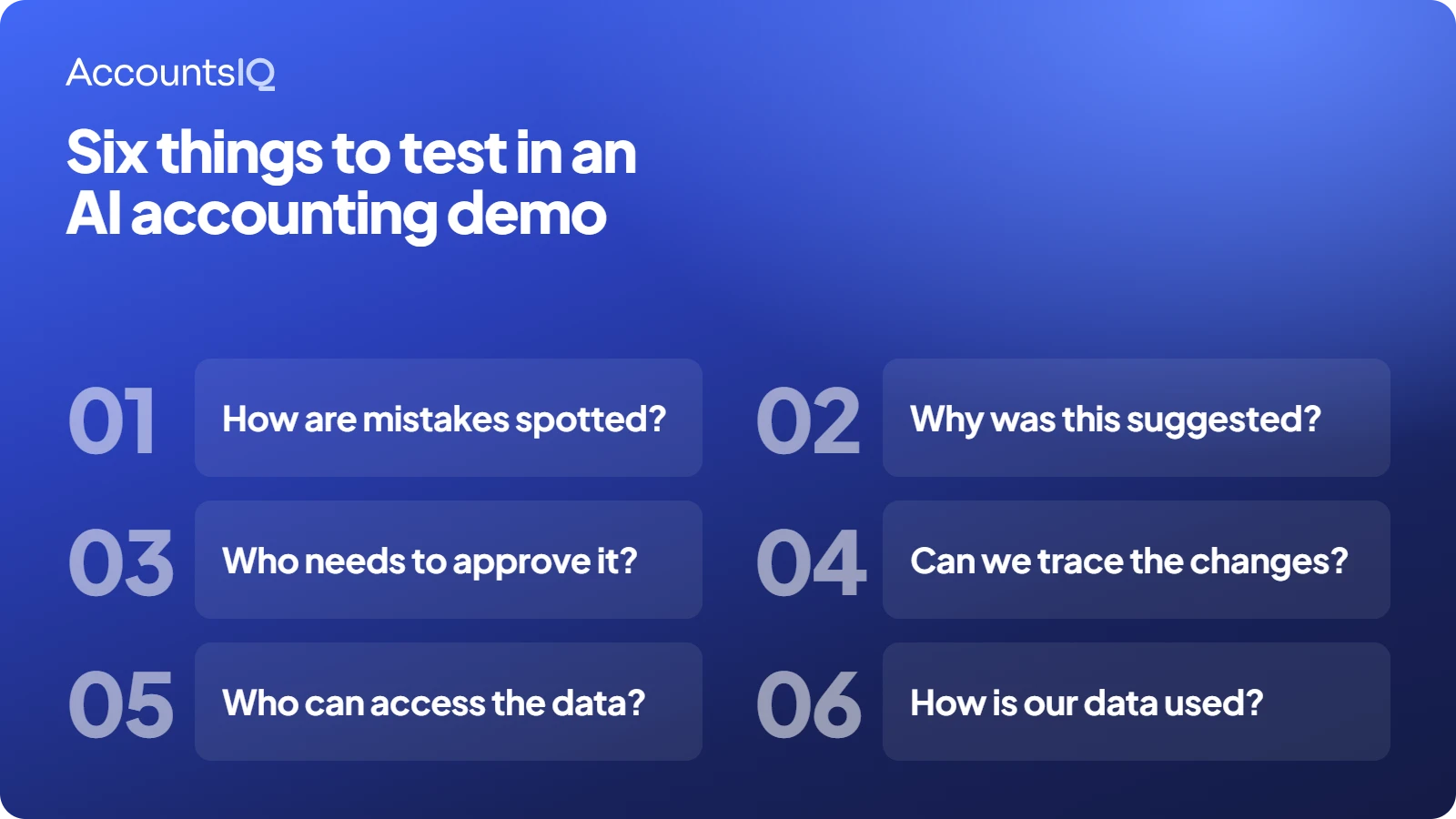
Six questions to ask every AI accounting software vendor
These questions also reflect what finance leaders say they need.
In AccountsIQ's CFO AI Paradox research, 26.1% of respondents selected confidence that AI errors would be caught before reaching a report as something that would make them more comfortable adopting the technology. Another 23.9% selected being able to see how often AI gets things wrong.
Respondents could select more than one reassurance, so these figures aren't mutually exclusive.
When reviewing a vendor's answers, pay attention to what they can actually demonstrate. A promise that the system is accurate is less useful than being shown how it deals with a questionable transaction.
It's also worth asking whether the AI works within your existing accounting process or requires staff to move information between separate applications.
How to test AI accounting software before buying
A demonstration is a useful introduction, but a short trial with your own data is a better way to assess whether the software will save your team time.
You don't need to test every feature at once. Start with one process that's taking up a noticeable amount of time.
Four steps for a useful AI accounting software trial
1. Choose a process and a sample of transactions
Start with something measurable, such as invoice coding or payment matching.
Use a suitable sample of real transactions, including some of the awkward cases your team regularly deals with. Agree how the data will be handled before sharing it with a vendor.
2. Record how long the work takes today
Include preparation, checking, and correcting mistakes.
If coding a batch of invoices takes two hours, for example, record how much of that time is spent entering information and how much is spent reviewing it.
3. Run the AI with human review
Allow the software to make suggestions, but have someone check the results.
Record which suggestions are accepted, changed, or rejected. If the AI makes a mistake, note whether it flagged the problem or the reviewer found it.
4. Compare the results
Look at:
- Time spent preparing the work.
- Time spent checking suggestions.
- Number of correct and incorrect suggestions.
- Mistakes the software failed to identify.
- Time needed to make corrections.
You should also consider whether the new process creates additional work elsewhere, such as exporting information or maintaining a separate approval record.
A faster first step isn't necessarily a faster overall process.
Why your existing accounting system matters
AI is only as useful as the information it works with.
If supplier records are duplicated, costs are coded inconsistently, or important information sits in separate systems, AI may struggle to produce reliable suggestions.
These are already familiar problems for finance teams.
Research from ACCA and CA ANZ found that data quality issues (42%), a lack of appropriate skills (42%), and difficulty connecting information from different systems (40%) were major barriers to making better use of finance data.
Adding AI doesn't automatically resolve these problems.
Before introducing new features, check that your accounting records are in good order:
- Cost codes: Are similar transactions recorded consistently?
- Supplier records: Are details accurate and duplicates removed?
- Connected systems: Does information reach the ledger without repeated manual entry?
- Approvals: Is it clear who can approve different types of transactions?
- Reporting: Can you trace a reported figure back to the transactions behind it?
You don't need perfect data to start using AI, but you do need to understand where the weaknesses are.
Otherwise, the technology may end up repeating problems that the finance team already spends time correcting.
What about AI accounting software for multi-entity businesses?
Managing several companies brings additional complications.
Each entity may have different cost codes, currencies, reporting requirements, and approval arrangements. The group finance team then needs to bring all of that information together.
Take two subsidiaries that pay for the same software subscription.
One records the cost under IT, while the other records it under administration. Both might have followed their local accounting rules correctly, but the group still needs a consistent view of software costs.
An AI feature that makes coding suggestions based on previous transactions won't necessarily resolve that difference.
The underlying accounting system needs to support the way costs are recorded and reported across the group.
When evaluating AI accounting software for a multi-entity business, check:
- Consistent reporting: Can different local cost codes be mapped to common group reporting categories?
- Currencies: Does the software handle foreign currency transactions and group reporting correctly?
- Intercompany transactions: Can transfers and balances between entities be identified and dealt with accurately?
- Access permissions: Can users only see information for the entities they're authorised to work with?
- Transaction history: Can you trace a group figure back to the original transaction?
These requirements matter whether the software uses AI or not.
But introducing AI makes it particularly important to understand how the technology handles information from different entities, and whether its suggestions follow the right accounting rules.
Should you add an AI tool or change accounting platforms?
That depends on what's causing the problem.
If your existing accounting system works well, and one task is creating unnecessary work, adding a specialist tool might be the most practical option.
If the problems run deeper, such as inconsistent reporting, disconnected approvals, or spreadsheet-heavy consolidation, another AI tool may not solve them.
There's no reason to replace a capable accounting system just to gain access to AI.
Equally, adding new software to a system that's already difficult to manage can leave the finance team with another application to maintain and reconcile.
The better starting point is to understand where the time is being lost and what would actually remove that work.
How AccountsIQ approaches AI in accounting
AccountsIQ builds AI into everyday accounting processes, helping finance teams spend less time preparing work while keeping control over the results.
Its AI features can help with tasks such as:
- Matching payments: Suggesting matches between outstanding invoices and receipts or payments.
- Preparing prepayments: Creating draft journals from invoice information, ready for review.
- Spotting unusual activity: Alerting finance teams to transactions or changes they've chosen to monitor.
AccountsIQ's approach keeps people involved. AI-generated suggestions can be reviewed before approval, with explanations, user permissions, and audit trails helping teams understand what's happened.
And because AI works within AccountsIQ's wider accounting platform, finance teams can use it alongside their existing reporting, consolidation, and approval processes.
💡 Explore AccountsIQ AI and see how it can help your finance team reduce manual work while staying in control.
Frequently asked questions about AI accounting software
Which AI software is best for accounting?
The best choice depends on the size and complexity of your business, your existing accounting system, and the tasks you want to improve.
Look for software that handles your day-to-day requirements, provides clear approval controls, and lets you check the results. If you manage several entities, group reporting and consolidation should also be part of the evaluation.
Can AI do my bookkeeping?
AI can help with bookkeeping tasks such as entering invoice information, suggesting transaction codes, and matching payments.
However, the results still need appropriate checks. Unusual transactions, accounting estimates, and financial sign-off may require professional judgement.
Can ChatGPT do bookkeeping?
ChatGPT can help explain accounting information, analyse data, and draft commentary. It can also support connected workflows where suitable tools and permissions are in place.
However, it doesn't replace the need for an accounting system that maintains reliable transaction records, supports approvals, and produces financial reports. Businesses should also check how confidential financial information is handled before using it with general-purpose AI tools.
What's the difference between AI accounting software and accounting automation?
Accounting automation follows rules you define, such as sending an invoice for approval when it exceeds a set amount.
AI accounting software can recognise patterns and make suggestions, such as recommending a cost code or identifying a possible payment match.
Most finance teams will benefit from using both, with appropriate checks for the work being carried out.
Can AI accounting software help with month-end close?
Yes. Depending on the platform, it can help prepare draft journals, identify unmatched transactions, and highlight items that may need attention.
Finance teams still need to check the completeness and accuracy of the accounts, particularly where estimates, adjustments, or unusual transactions are involved.