

Invoices land in a shared inbox. Someone forwards them to the right approver, who is on annual leave. A query comes back three days later about a purchase order nobody can find. Meanwhile, the same supplier details get keyed into two different systems because the accounting platform and the AP process were never properly connected.
This is what manual accounts payable looks like at scale, and it is why many finance teams start looking at automation.
Accounts payable automation uses software to streamline the invoice-to-payment process by:
- Capturing and extracting invoice data
- Validating, coding and matching invoices
- Routing them for approval
- Posting approved invoices to the ledger
- Preparing payments and supporting reconciliation
Each stage removes a specific point of friction, delay or error.
For a multi-entity finance team, the impact goes beyond processing speed. The way AP is structured determines whether invoice data flows cleanly into entity-level accounts, consolidation and group reporting, or whether finance has to rebuild that picture manually every month.
In short: Accounts payable automation handles the repetitive, rules-based stages of processing supplier invoices while keeping people involved where judgement and control matter. The result is less manual entry and chasing, better visibility over liabilities and a cleaner flow of AP data into financial reporting.
What is accounts payable automation?
Accounts payable automation is the use of software to manage repetitive parts of the invoice-to-payment process, from the moment an invoice arrives through to approval, posting, payment preparation and reconciliation.
In a manual process, these stages rely heavily on people remembering to act, finding the right approver and entering information into the finance system by hand.
That can be manageable when invoice volumes are low and there is one entity to look after. It becomes harder to sustain as volumes increase, approvers are spread across departments or entities, and finance needs to know where every invoice sits at any given moment.
Automation takes on the repeatable work, such as:
- Checking for duplicates
- Matching invoices to existing purchase orders
- Applying standard coding
- Routing invoices according to approval rules
- Preparing approved invoices for payment
Finance stays involved in the exceptions, controls and decisions that need judgement.
How accounts payable automation works, from invoice to payment
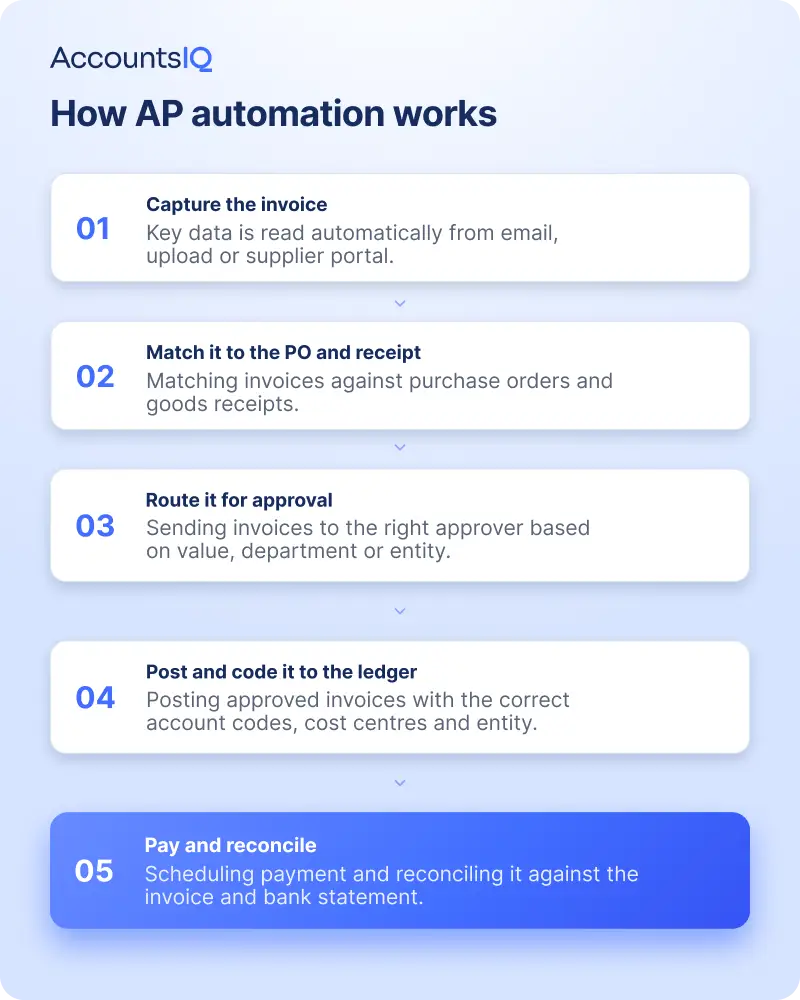
A typical automated AP process follows five stages. The exact workflow varies by system, but the principle is the same: automate predictable work and bring people in when something falls outside the rules.
1. Capture and extract the invoice
Invoices arrive by email, upload or another agreed channel.
Invoice capture software reads information such as the supplier, invoice number, date, value and line details and turns it into structured data. Optical character recognition, or OCR, is commonly used to extract information from PDF invoices.
This removes much of the manual typing involved in taking data from an invoice and entering it into the finance system.
2. Validate, code, and match it
The system checks the invoice against the information finance already holds.
That can include validating the supplier and invoice number, checking for duplicates, applying expected general ledger or dimension coding, and matching a PO-backed invoice to its originating purchase order.
Where the invoice meets the configured rules, it can move through the process with minimal intervention. Where something does not match, the exception is surfaced for somebody to review.
3. Route it for approval
The invoice is sent to the appropriate approver according to rules set by finance.
Those rules might be based on:
- Invoice value
- Department
- Cost centre
- Entity
- Supplier
- Purchase type
- Approval hierarchy
This removes the need for finance to work out who needs to approve each invoice and chase it manually.
Approvers still make the decision. Automation gets the right invoice to the right person and keeps the process moving.
4. Post the approved invoice to the ledger
Once the required checks and approvals are complete, the invoice can be posted to the purchase ledger with its associated account and reporting dimensions.
This stage matters well beyond AP.
Consistent coding determines whether supplier spend can be analysed properly later by entity, department, project, cost centre or another reporting dimension. Poor coding at invoice level often becomes a reporting problem at month-end.
5. Prepare payment and reconcile
Approved invoices can then feed into the payment process according to supplier terms and due dates.
Automation can help finance build payment runs, generate payment files, allocate payments against outstanding invoices and support bank reconciliation.
Payment control should still remain deliberate. Changes to supplier bank details, unusual payments and payment release itself are examples of areas where appropriate review and authorisation remain important.
Those controls matter. The Home Office's Economic Crime Survey 2024 found that 11% of UK businesses with employees experienced fake invoice fraud, while 7% experienced mandate fraud, where criminals attempt to divert payments by getting a business to change bank details.
What can you automate in accounts payable?
Not every AP task should run without oversight.
The most effective approach is usually to automate high-volume, predictable work while keeping people responsible for exceptions, decisions and payment controls.
| Stage | What automates well | Where human judgement or control remains |
|---|---|---|
| Invoice capture | Extracting standard invoice data from supported formats | Unreadable files, unusual formats and missing information |
| Validation and matching | Duplicate checks, supplier validation and matching PO-backed invoices | Mismatches, invoices without the expected PO and unusual supplier information |
| Coding | Repeat suppliers and transactions with predictable coding | New suppliers, unusual purchases and unclear treatment |
| Approval | Routing according to value, entity or departmental rules | Judgement on unusual or borderline spend |
| Payment | Building payment runs, selecting due invoices and generating payment files | Payment release, changed bank details, unusual or high-value payments and disputes |
| Reconciliation | Matching and allocating straightforward transactions | Unclear transactions and reconciliation exceptions |
The aim is not touch-free AP at any cost. It is to reduce unnecessary manual handling while preserving the controls finance actually needs.
Benefits of accounts payable automation
The value of AP automation depends on the business and the complexity of its finance operation.
For a single-entity organisation, the biggest gains may be processing speed and reduced administration. For a multi-entity group, the benefits can extend into control, consolidation, audit readiness and management reporting.
Less processing time and a lower manual workload
The cost of processing an invoice varies significantly depending on how much manual entry, checking, chasing and correction is involved.
The UK government's 2025 e-invoicing consultation received 342 responses, with respondents reporting invoice-processing costs ranging from negligible amounts to more than £50 per invoice. The government cautioned that the responses were not representative enough to establish a reliable average, but they illustrate how sharply costs can vary depending on the process involved.
Automating capture, validation, matching and approval targets much of the repetitive work behind those costs.
Fewer errors and a lower duplicate-payment risk
Manual re-keying creates opportunities for transposed figures, duplicate entries and inconsistent coding.
Automated validation can flag repeated invoice numbers and other inconsistencies, while matching controls can identify differences between an invoice and the purchase information finance already holds.
That means exceptions can be investigated before an invoice reaches payment.
Better control and visibility
With a structured AP workflow, finance can see what has been received, what is awaiting approval and what is ready for payment without relying on email chains and spreadsheets.
Approval history also creates a clearer audit trail of who reviewed a transaction and when.
Payment delays remain a material issue too. Official Department for Business and Trade statistics show that large UK businesses paid 15% of invoices late in 2025, with 14% of total invoice value paid after agreed terms. The median time taken by large businesses to pay suppliers was 32 days.
Better AP visibility will not eliminate late payment by itself, but it gives finance a clearer view of invoices approaching due dates and where approval bottlenecks are holding payments up.
Better AP data for financial insight
Once invoices are captured and coded consistently, AP becomes useful management data rather than just a record of bills waiting to be paid.
Finance can get a clearer view of upcoming liabilities, supplier spend, approval bottlenecks and spending patterns across departments or entities.
That gives AP a direct role in cash planning and management reporting, rather than leaving those insights to be reconstructed at month-end.
💡 Book a demo to see how AccountsIQ can automate accounts payable and give finance greater visibility across your group.
What a multi-entity finance team needs from an AP system
An AP setup that works for one entity can become difficult to manage once additional entities, approval structures or currencies are involved.
For multi-entity groups, look beyond invoice capture alone.
Per-entity approval workflows
Different entities may have different approvers, value thresholds and governance requirements.
Your AP system should let finance reflect those differences without creating a separate manual workaround for each business.
Consistent, consolidation-ready coding
Invoices need to be coded in a way that supports both local reporting and group reporting.
If different entities use inconsistent structures, AP data may still require significant manipulation before consolidation.
Clear approval history
Finance leaders and auditors should be able to trace what happened to a transaction, including its approval status and history.
Cross-entity reporting
AP information should contribute to management reporting across the group, not sit in isolated entity-level processes.
A reliable connection to the general ledger
Whether AP automation is native to the finance platform or provided through an integrated specialist tool, approved invoice data needs to reach the ledger accurately and consistently.
The fewer manual hand-offs involved, the lower the risk of discrepancies appearing at month-end.
Native AP automation vs a separate AP tool
There are two common ways to automate AP: use capabilities inside the financial management system or connect a dedicated AP platform to it.
Both can work.
The important question is what happens to the data between invoice capture and the general ledger.
Using a dedicated AP platform
A specialist AP tool can be a good fit where a business already has an established process or needs functionality provided by that platform.
The integration then becomes critical.
Finance should check how reliably supplier information, coding, approval status, entity data and invoice details move into the accounting system, and how exceptions or failed synchronisations are handled.
Keeping AP within the finance system
Where the finance platform provides native AP functionality, capture, coding, approvals and posting can work against the same supplier records, chart of accounts and entity structure used for financial reporting.
That removes an additional AP-to-ledger sync point and reduces the risk of discrepancies being discovered during close.
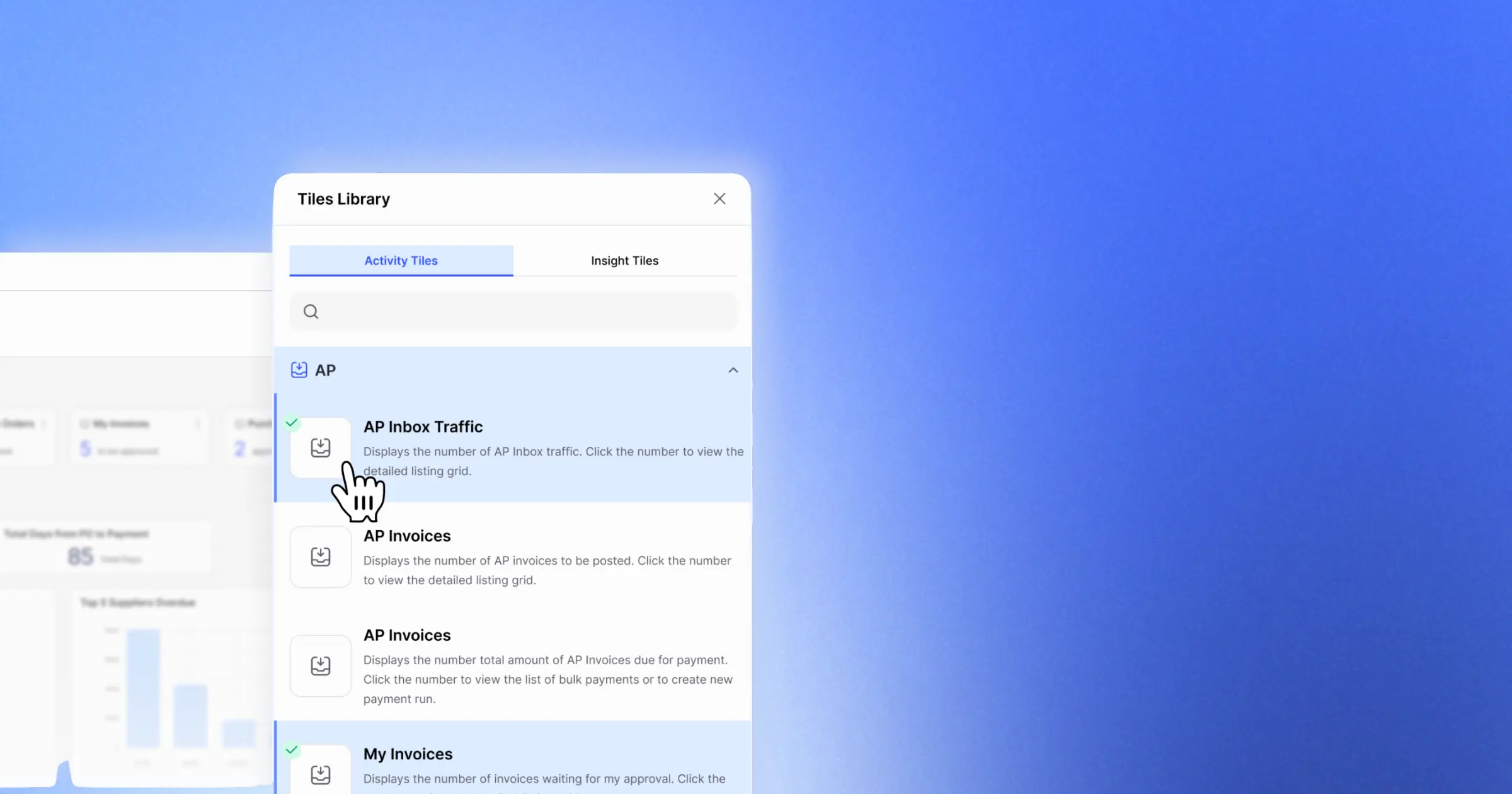
AccountsIQ supports both approaches. Its own AP Inbox can scan PDF invoices into draft purchase invoices, check for duplicates and match invoices to originating purchase orders, before invoices move into approval workflows. Businesses already committed to specialist platforms such as Lightyear can also integrate approved invoices into AccountsIQ.
💡 Book a demo to see how AccountsIQ connects AP automation with your general ledger, approvals, and multi-entity reporting.
When is it worth automating accounts payable?
There is no universal invoice-volume threshold at which AP automation suddenly becomes worthwhile.
The business case becomes stronger once repetitive processing, approval delays, limited visibility or control risk start costing more than the effort required to automate the process.
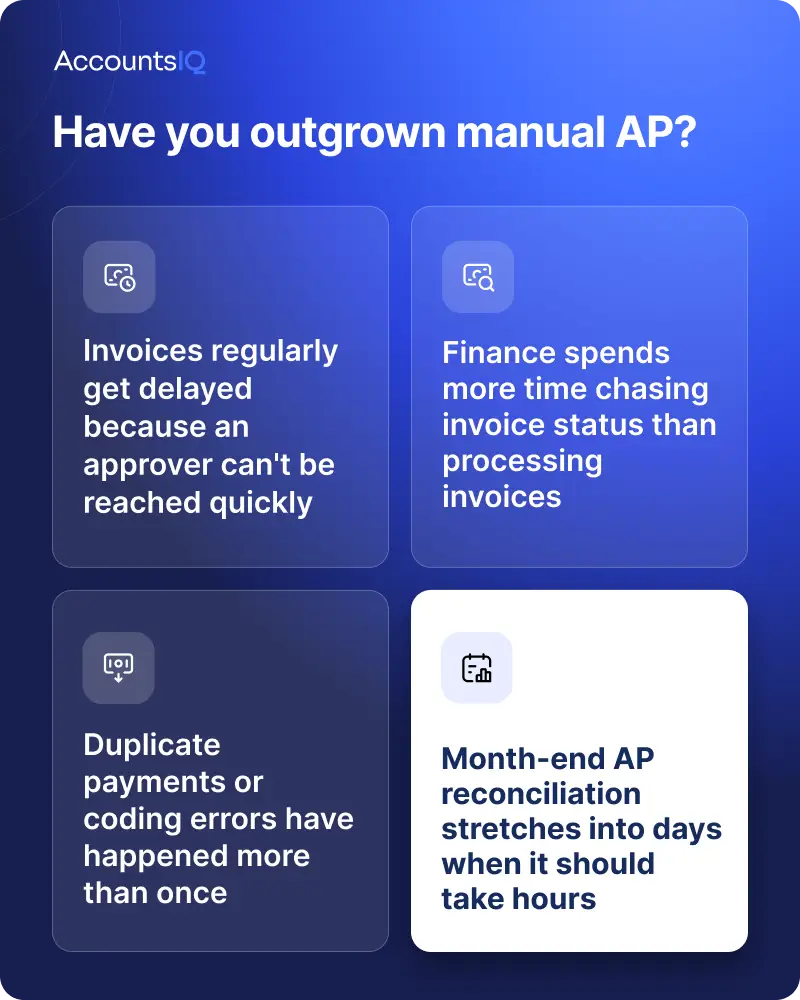
Signs you may have outgrown manual AP
Common warning signs include:
- Invoices regularly waiting because the right approver cannot be reached
- Finance spending more time chasing invoice status than handling exceptions
- The same supplier or invoice information being entered into multiple systems
- Duplicate invoices or coding errors occurring repeatedly
- Payment runs requiring extensive spreadsheet preparation
- Finance struggling to see upcoming liabilities clearly
- Month-end AP reconciliation taking days rather than hours
- Reporting teams having to clean or rework AP data before consolidation
Why multi-entity teams often reach that point sooner
Every additional entity can add another combination of approval routes, suppliers, currencies and reporting dimensions.
That increases the amount of coordination finance has to manage.
A process that feels manageable for one entity can become disproportionately labour-intensive across a group, even if invoice volume per entity has not changed dramatically.
How AP automation helps speed up month-end and group reporting
Month-end is often where the true cost of a manual AP process becomes visible.
If invoices are still being chased, entered, coded or corrected in the final days of the month, the close is delayed and the reporting team is working with an incomplete view of liabilities.
As a useful benchmark, APQC data across a sample of 3,389 organisations puts the median cycle time for completing the monthly financial close at eight days. Getting AP data into the ledger accurately and on time is one part of reducing avoidable pressure within that wider close process.
A more structured AP process helps move that work upstream.
Invoices are captured earlier. Coding is more consistent. Approval status is visible before the final days of the reporting period.
For AccountsIQ customers using its native AP functionality, invoices processed through the AP Inbox and approval workflow sit within the same financial platform used for ledger accounting and multi-entity reporting.
AccountsIQ can help finance teams:
- Create draft purchase invoices from PDF invoices
- Check for duplicates
- Match qualifying invoices to purchase orders
- Carry GL and BI coding into the invoice process
- Prepare payment runs using approved, outstanding supplier invoices
- Add payment approval where required
For multi-entity finance teams, that creates a cleaner route from supplier invoice to entity-level accounts and group reporting, with less need to rebuild AP information from disconnected exports at month-end.
💡 Ready to reduce manual AP work and build a more connected finance process? Book a demo of AccountsIQ.
Making Tax Digital, e-invoicing and April 2029: what UK finance teams need to know
Digital tax requirements are giving finance teams another reason to look at how structured their invoice processes are.
There are two separate developments to understand.
Making Tax Digital for VAT is already in place
Making Tax Digital for VAT requires VAT-registered businesses to keep the required VAT records digitally and submit VAT returns using compatible software.
All VAT-registered businesses should now be using Making Tax Digital for VAT unless an exemption applies.
MTD is not the same thing as mandatory e-invoicing.
It governs digital record-keeping and VAT return submission. E-invoicing concerns the way invoice data itself is issued and exchanged.
Mandatory UK e-invoicing begins in April 2029
The government has confirmed that, from April 2029, businesses will be required to issue VAT invoices in a specified electronic format. The mandate covers VAT invoices for business-to-business and business-to-government transactions.
An e-invoice is more than a PDF sent by email. It is structured invoice data that can be exchanged between financial systems and processed electronically.
In June 2026, the government also confirmed that Peppol will be the core interoperability network for UK e-invoicing. A fuller implementation roadmap is due at Budget 2026, with further standards, technical specifications, guidance and legislation to follow ahead of the 2029 mandate.
What finance teams can do now
The final compliance requirements are still being developed, so businesses should avoid assuming that their current invoice automation automatically makes them 2029-ready.
What they can do now is strengthen the underlying process.
That means making sure invoice data is captured in a structured way, supplier records are reliable, coding is consistent, and approval workflows are not dependent on email or paper.
Those foundations should make it easier to adapt once the final UK e-invoicing specifications are confirmed.
UK groups with EU operations also have a separate timetable to consider. Under the EU's VAT in the Digital Age reforms, Digital Reporting Requirements for relevant cross-border B2B transactions take effect from 1 July 2030 and will be based on e-invoicing.
How to get started with accounts payable automation
AP automation does not have to be an all-or-nothing project.
Start with the part of the process causing the most friction and build from there.
1. Map the current process
Follow an invoice from arrival to payment.
Record:
- How it reaches finance
- Where information is entered manually
- Who needs to approve it
- How often finance has to chase
- Where exceptions occur
- How it reaches the ledger
- How the payment is prepared
- What has to be reconciled afterwards
This gives you a baseline rather than automating a process you do not fully understand.
2. Measure the biggest sources of friction
Useful measures include:
- Average time from invoice receipt to approval
- Number of invoices requiring manual correction
- Time spent entering invoice data
- Number of approval chasers
- Duplicate or incorrectly coded invoices
- Time spent preparing payment runs
- Time spent reconciling AP at month-end
You do not need to measure everything. Focus on the problems that consume the most finance time or create the most risk.
3. Automate the heaviest repeatable step first
For many teams, invoice capture and approval routing are sensible starting points because they involve high volumes of repetitive work.
For others, matching, coding or payment preparation may be the bigger bottleneck.
Automate where the evidence says the problem is.
4. Decide how AP should connect to the finance system
Consider whether AP automation should run within your financial management platform or through a dedicated integrated tool.
Either way, examine the complete path into the ledger.
The goal is not simply to process an invoice faster. It is to make sure accurate, approved and consistently coded AP data reaches the financial records finance relies on.
5. Keep controls around the exceptions
Automation works best when the rules are clear.
Define which transactions can move automatically, which require approval and which should always be escalated.
Supplier bank detail changes, large or unusual transactions and payment release are good examples of areas where stronger controls may be appropriate.
Frequently asked questions about accounts payable automation
What is the difference between invoice automation and accounts payable automation?
Invoice automation usually refers to capturing and processing invoice information.
Accounts payable automation is broader. It can cover invoice capture, validation, matching, coding, approval, ledger posting, payment preparation and reconciliation.
Is accounts payable automation worth it for a small or low-volume finance team?
It can be, but invoice volume is not the only factor.
A lower-volume team may still benefit if manual processing is causing approval delays, repeated errors or poor visibility. Multi-entity businesses can also justify automation earlier because the complexity of the process increases across entities even when volumes are relatively modest.
Does AP automation replace finance jobs?
AP automation is designed to reduce repetitive manual work such as data entry, routing and chasing.
Finance teams still need to manage exceptions, oversee controls, review unusual transactions, release payments and make decisions that require judgement.
The aim is to spend less time administering the process and more time on work that requires finance expertise.
Will e-invoicing be mandatory in the UK?
Yes. The UK government has confirmed that businesses will be required to issue VAT invoices in a specified electronic format from April 2029. Peppol has been selected as the core interoperability network, with more detailed implementation guidance still to come.
Is a PDF invoice sent by email an e-invoice?
Not necessarily. For the purposes of the forthcoming UK regime, e-invoicing is about structured invoice information that can be exchanged electronically between systems. An ordinary PDF attached to an email does not by itself provide that structured system-to-system exchange.
What should a finance team automate first?
Start with whichever stage creates the most repetitive work, delay or error today.
For many teams, that will be invoice capture or approval routing. But the right starting point depends on the process. Map it, measure where the friction occurs and automate the most significant repeatable problem first.