


By the time the group P&L is ready, the operations team may already have made its decisions.
For growing restaurant groups, month-end can mean matching EPOS sales to card and delivery payouts, reconciling intercompany charges, and piecing together site results in Excel. The longer that takes, the less useful those numbers become.
So, when does your accounting software start holding you back? Here's what multi-site restaurant groups should look for, where entry-level tools can fall short, and how to choose a system that fits.
💡 The short answer: Xero or QuickBooks may be enough for a single restaurant or a relatively straightforward group. But as the number of companies, sites, and reporting requirements grows, a multi-entity accounting system can make consolidation, intercompany accounting, and site-level reporting considerably easier to manage.
What is restaurant accounting software?
Restaurant accounting software manages a hospitality business's financial records, including the general ledger, sales and purchase accounting, bank reconciliation, VAT, and financial reporting.
It's different from the operational systems restaurants use every day:
- EPOS records sales, discounts, refunds, and payment methods.
- Inventory and purchasing software tracks stock, ingredients, supplier purchases, and food costs.
- Payroll records employee pay and associated costs.
- Card processors and delivery platforms provide settlement and fee information.
- Accounting software brings the financial results together for reconciliation, reporting, and statutory accounts.
Some platforms combine several functions, while others connect through integrations.
For multi-site groups, the important thing is that finance can produce accurate, consistent reports without re-entering information or manually piecing together data from different systems.
AccountsIQ sits at the accounting end of this setup, connecting financial information from operational systems into the ledger.
Is Xero or QuickBooks enough for a restaurant?
For a single restaurant trading through one company, Xero or QuickBooks may be all you need.
Both support everyday accounting tasks, including bank reconciliation, supplier invoices, VAT, and financial reporting. Their wider ecosystems also offer additional functionality through connected applications.
The requirements change as a restaurant group expands, although the number of sites alone doesn't determine which accounting system you need.
Sites and companies aren't the same thing
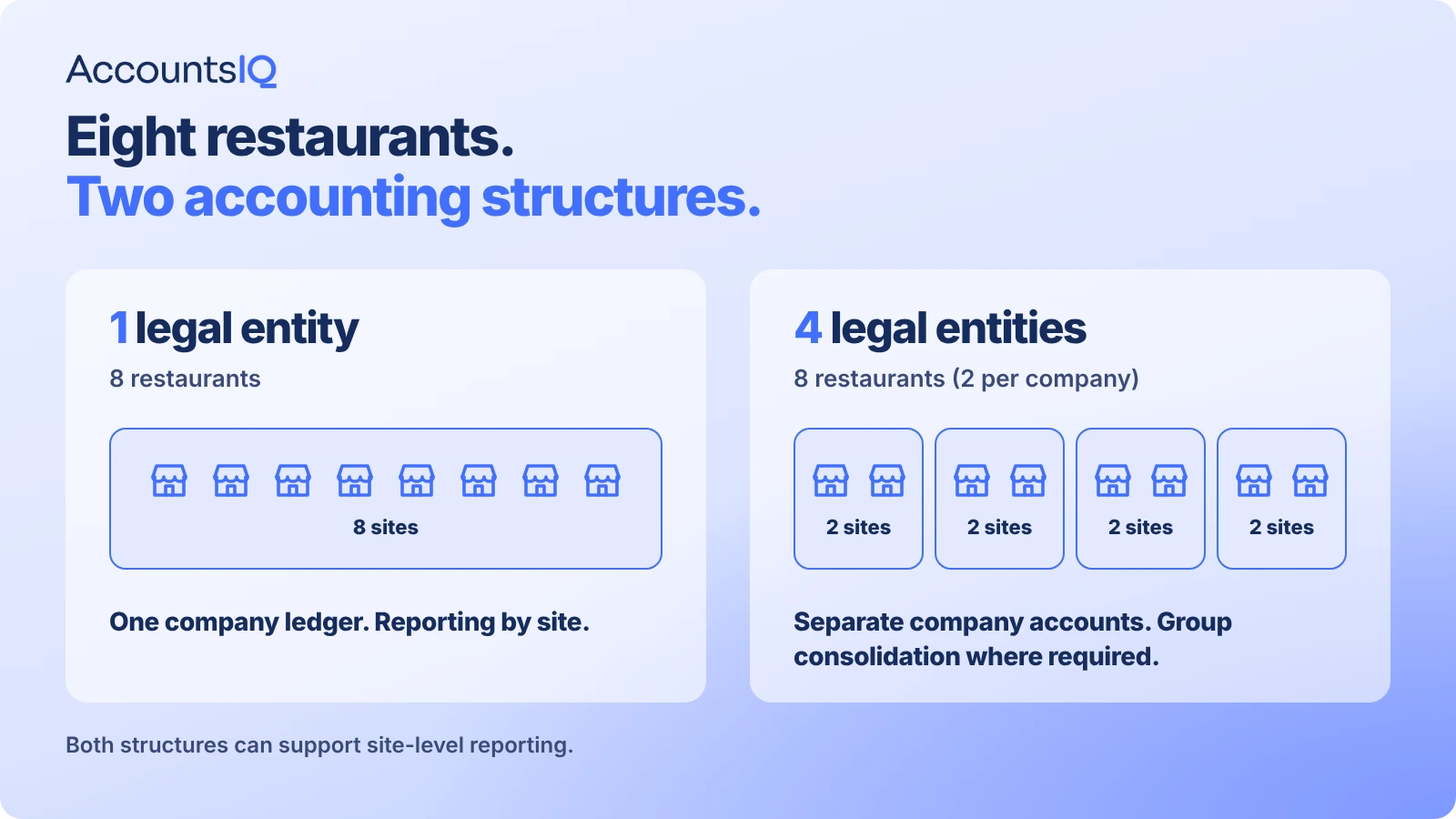
Say you run eight restaurants through one legal company. You don't necessarily need eight separate ledgers. One ledger with reporting dimensions for location, brand, and sales channel may be sufficient.
If those restaurants operate through four different companies, each company needs its own accounting records, while head office may also need to manage intercompany transactions and produce consolidated results.
Franchise networks introduce another complication, particularly where restaurants are independently owned.
These distinctions matter when choosing a system and deciding how to structure your accounts.
Can entry-level software still work for groups?
Yes. For example, Syft Analytics within Xero's ecosystem offers consolidation and management reporting capabilities.
If your existing ledgers work well and reporting is the main frustration, an additional reporting application may be enough.
But when finance is also managing manual intercompany postings, inconsistent coding, and fragmented approval processes, it's worth reviewing the underlying accounting setup.
When does a restaurant group outgrow its accounting software?
A common warning sign is when combining the numbers takes longer than recording them.
Transactions are posted throughout the month, yet producing a consolidated management pack still involves days of spreadsheet work.
Other signs include:
- Consolidation happens in Excel. Group results depend on exports, formulas, and manual checks.
- Intercompany balances don't reconcile easily. Head office charges, shared staff costs, and central purchasing need separate entries across companies.
- Site P&Ls need rebuilding. Finance can't produce consistent location-level results directly from the accounting data.
- Sales and settlements are difficult to match. Card receipts, delivery payouts, refunds, and platform fees require regular investigation.
- Approvals happen outside the system. Supplier invoices and supporting information are scattered across inboxes.
- New openings create more workarounds. Every additional restaurant or company adds to the month-end workload.
None of this necessarily means the current software is unsuitable. It may simply have been configured for a smaller business.
The point to reconsider it is when those workarounds start delaying reporting, limiting financial control, or making expansion harder to manage.
What should multi-site restaurant accounting software do?
A multi-site group needs accurate company accounts and a reliable view of performance across the estate.
Here's what to look for.
Multi-entity accounting and consolidation
Where restaurants operate through separate legal entities, finance needs to maintain individual company records while producing group results.
Multi-entity accounting software should allow companies to share a consistent reporting structure without losing their individual accounting records.
It should also support the consolidation adjustments required for group reporting, including intercompany eliminations and currency translation where applicable.
If your group operates in sterling and euro, ask vendors to demonstrate how they translate company results and manage exchange differences.
Intercompany recharges and eliminations
Restaurant groups regularly share costs.
A central kitchen might supply several restaurants, while head office recharges management costs, property expenses, or shared employees to other companies.
Those transactions need to be recorded correctly in both entities and reconciled before consolidation.
Look for functionality that helps finance create matching transactions, identify differences, and maintain a record of adjustments.
With AccountsIQ, intercompany charges can be recorded in the receiving company, where they remain unposted until reviewed, coded, and accepted. Intercompany eliminations can then be configured for the consolidation process.
Reporting by site, brand, and sales channel
A company-level P&L only tells part of the story.
Finance may also need to compare individual restaurants, brands, regions, and trading channels, or report actual performance against site budgets.
Reporting dimensions allow transactions to be assigned to those categories without creating unnecessary nominal codes or separate companies.
AccountsIQ supports dimensional reporting, with two dimensions on Core, up to four on Growth, and up to six on Scale, according to its published product documentation.
The coding structure needs careful planning. If one restaurant records agency labour under wages while another records it as an overhead, their labour margins won't be directly comparable.
Supplier invoices and approval controls
With multiple sites, invoices often need approval from local managers, department heads, or head office.
Look for approval workflows that reflect your structure, with supporting documents and a record of who authorised each transaction.
AccountsIQ provides one-step approval on Core and multi-step workflows on Growth and Scale.
Multi-currency and management reporting
Groups operating in the UK and Ireland need to handle sterling and euro transactions, relevant revaluations, and consolidated reporting.
They may also want to use Excel or Power BI to produce tailored management packs.
AccountsIQ supports Excel integration, with a connector for Excel and Power BI available on its Growth and Scale packages.
The benefit of a connected reporting process is that finance can work with current ledger information rather than rebuilding reports from disconnected exports each month.
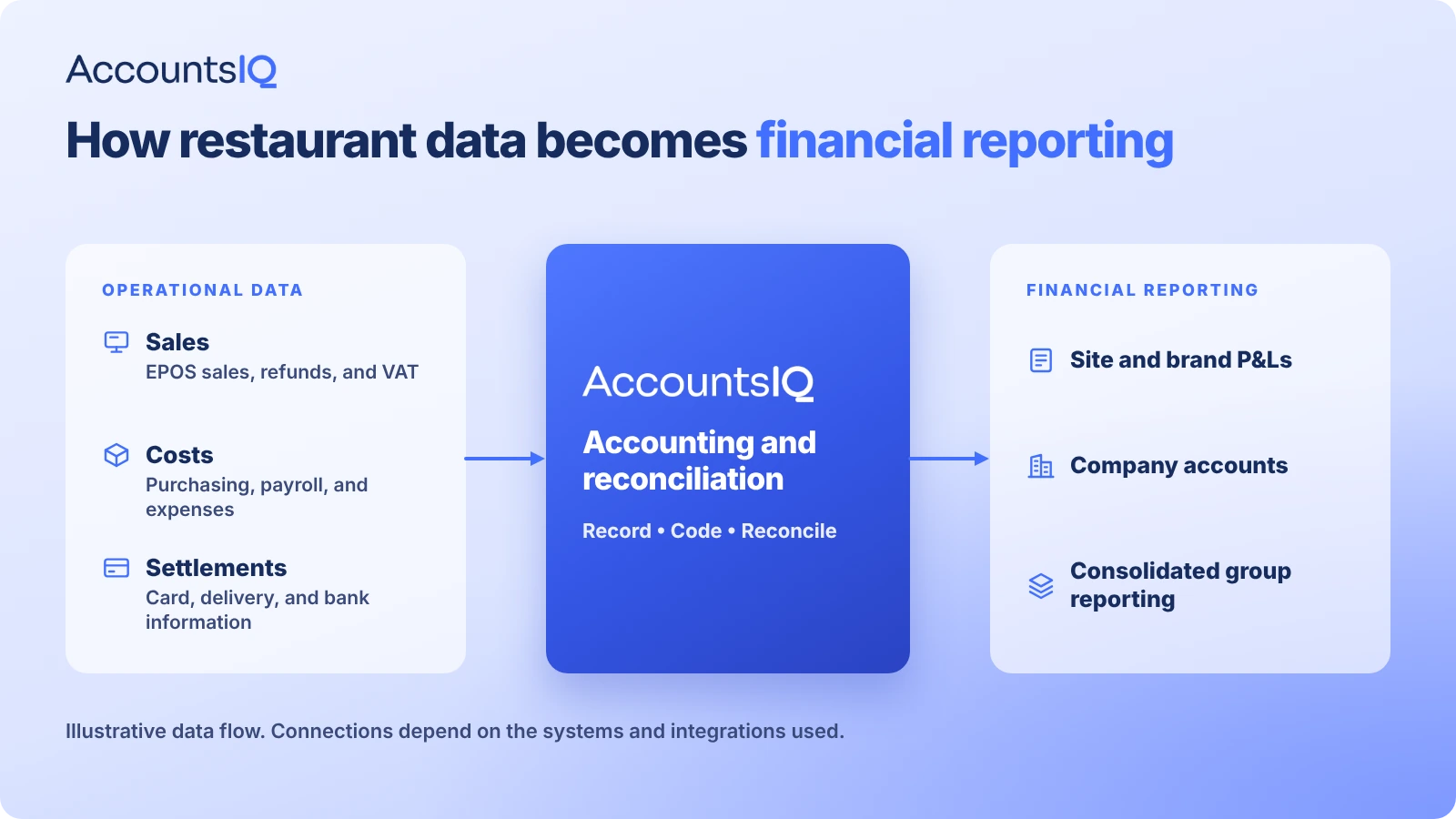
How should EPOS sales, card payments, and delivery payouts reach the ledger?
Restaurant accounting has a particular reconciliation challenge: sales happen every day, but the corresponding cash doesn't necessarily reach the bank at the same time or in the same amount.
A Friday card sale might settle on Tuesday. A delivery platform may pay weekly, after deducting commission, refunds, and other fees.
Your accounting process needs to distinguish between the sale, the amount awaiting settlement, and the cash received.
Daily EPOS summary journals
For many restaurant groups, a daily sales summary per site is sufficient for the general ledger.
The detailed transactions remain in EPOS, while the accounting system receives the information needed for financial reporting.
That typically includes sales by revenue type, discounts, refunds, VAT, payment methods, and the relevant site or brand codes.
AccountsIQ's open API can support daily journal imports coded by site and revenue type, subject to the EPOS provider and integration setup.
Card settlements and merchant fees
Suppose a restaurant records £2,000 in card sales on Friday, but the processor deposits a smaller amount a few days later because it has deducted fees.
Recording only the net bank receipt as revenue could understate sales and hide processing costs.
A common approach is to record the sale against a card clearing account. The eventual settlement clears the amount receivable, while merchant fees are recorded separately.
Finance can then identify outstanding settlements, fees, and any unexplained differences.
Delivery platform payouts
Delivery platforms work in a similar way, often with more deductions.
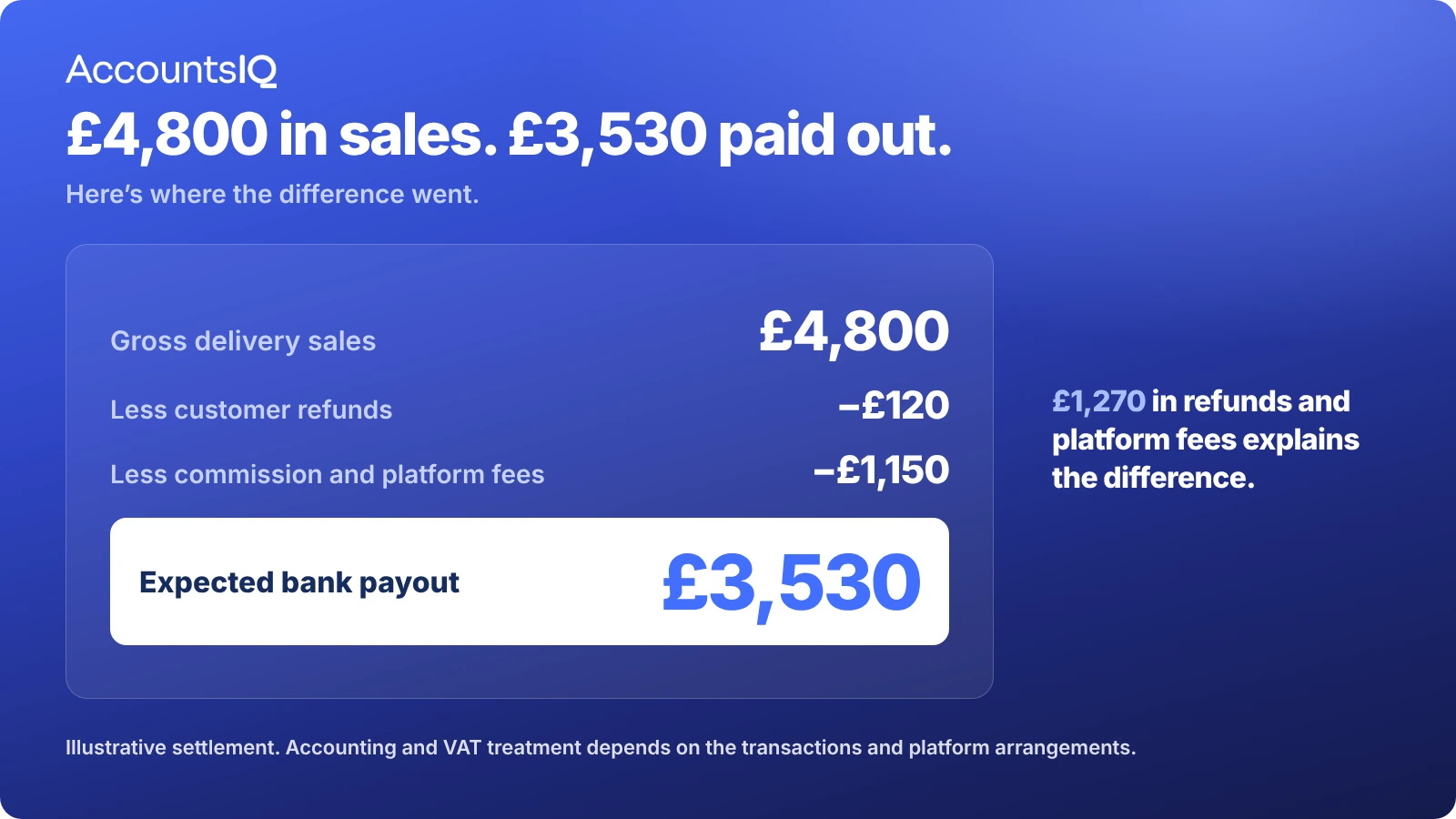
Consider this illustrative weekly statement:
The expected bank receipt is £3,530.
The £1,150 in platform fees represents approximately 24% of the gross sales shown in this example. That's the combined fees on the statement, rather than necessarily the commission rate or the restaurant's total cost of delivering those orders.
Recording the relevant charges separately gives finance a better understanding of delivery-channel profitability.
The table illustrates the settlement reconciliation, not a complete accounting journal. The correct revenue, fee, and VAT entries depend on the platform's contractual arrangements and the underlying transactions.
Don't overlook vouchers, tips, and deposits
Gift vouchers, customer deposits, and tips may require separate accounting treatment.
Before automating daily EPOS imports, agree how those transactions will be coded and reconciled.
Otherwise, incorrect source data can simply flow into the ledger more quickly.
Which restaurant KPIs should finance report by site?
Consistent accounting makes it easier to compare performance across restaurants.
Sales growth matters, but finance also needs to understand what happens to food costs, labour, occupancy costs, and delivery margins.
These figures are only useful for comparison when they're calculated consistently.
For example, one site's labour costs might include agency workers and employer National Insurance while another excludes them. Food purchasing costs may also need stock adjustments before they represent the cost of food actually sold.
Agree the definitions centrally, then use consistent coding and allocation rules across the estate.
A note on FRS 102: Lease accounting changes applying principally to periods beginning on or after 1 January 2026 can affect reported EBITDA, gearing, and occupancy-cost comparisons. Restaurant groups with significant leases should agree how these changes appear in management reports and lender covenant calculations.
💡 See the Financial Reporting Council's FRS 102 guidance.
Which UK and Irish rules should restaurant accounting software support?
Restaurant groups need systems that can preserve the correct tax treatment of transactions, including where individual orders contain items with different VAT rates.
Several requirements are worth checking during software selection.
UK VAT on catering and takeaway sales
Under HMRC's VAT Notice 709/1, food and drink consumed on restaurant premises is generally standard-rated.
Hot takeaway food can also be standard-rated, depending on the conditions, while many cold takeaway foods are zero-rated. Exceptions apply.
EPOS data therefore needs to reach the ledger with the appropriate VAT breakdown, rather than one undifferentiated sales total.
Tips and service charges
Compulsory service charges generally form part of the consideration for the underlying supply and are subject to VAT. Genuinely voluntary tips and discretionary service charges are outside the scope of VAT.
The Employment (Allocation of Tips) Act 2023 also imposes requirements on the fair allocation and record-keeping of qualifying tips and service charges in England, Scotland, and Wales.
The accounting process needs a clear record of amounts collected and distributed, including where a tronc arrangement is used.
💡 See HMRC's guidance on tips, gratuities, service charges, and troncs.
Irish restaurant and catering VAT
From 1 July 2026, Ireland's 9% second reduced VAT rate applies to qualifying restaurant and catering services, replacing the previous 13.5% rate.
Different rates still apply to particular foods and drinks, including alcohol, bottled water, and soft drinks. Takeaway sales also need to be assessed according to what is supplied.
See Irish Revenue's restaurant and catering VAT guidance.
For groups operating across the UK and Ireland, check that the ledger supports appropriate VAT codes by entity, effective-date changes, and separate tax reporting.
UK VAT-registered businesses also generally need to maintain digital records and submit VAT returns through compatible software under Making Tax Digital for VAT.
💡 This is general information, not tax or legal advice. Confirm the requirements applicable to your organisation using official guidance and qualified advisers.
Does a restaurant group need consolidated accounts?
Statutory consolidated accounts and consolidated management reporting serve different purposes.
In the UK, a parent company may be required to prepare group accounts unless an exemption applies. Eligibility depends on factors including group size and structure.
Irish companies are subject to the relevant Irish company law requirements.
The Companies House guidance explains the UK rules, including small-group exemptions.
Even where statutory consolidation isn't required, finance may still need consolidated management reports for the board, lenders, investors, and operational managers.
For many restaurant groups, that reporting need is a more immediate reason to invest in multi-entity accounting software.
How do you compare restaurant accounting software?
Start with the complexity of your group and the work finance currently handles outside the accounting system.
AccountsIQ sits in the mid-market multi-entity category.
If consolidation, company-level controls, and reporting are becoming difficult to manage, it's a category worth considering.
What should you ask vendors to demonstrate?
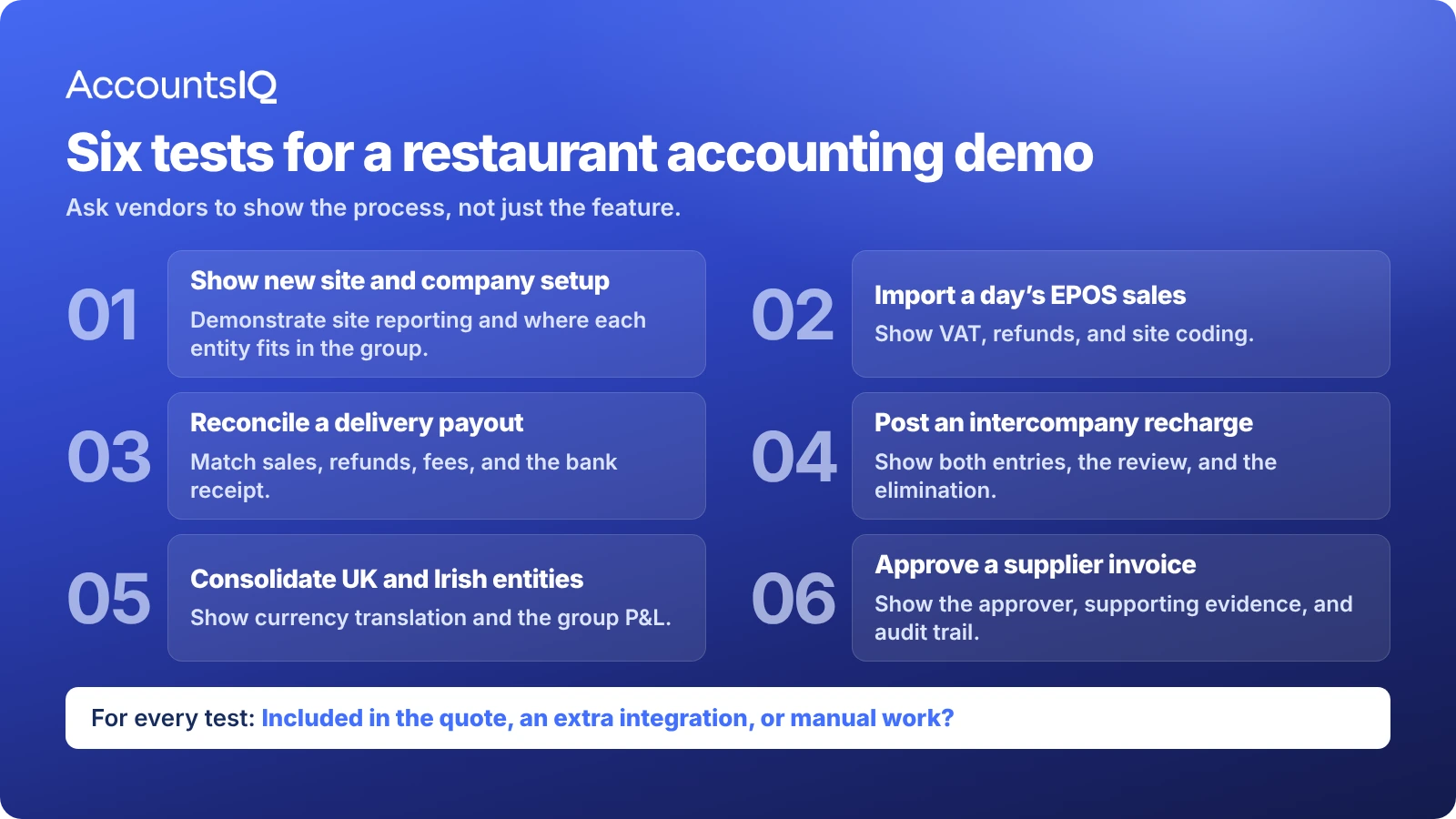
A standard product demonstration can make almost any accounting system look capable.
A better test is to give vendors a simplified version of your group structure and ask them to complete a few familiar finance tasks.
For example:
- Add a restaurant. Show how a new site appears in the company accounts and group reporting.
- Import EPOS trading. Bring in sales, refunds, discounts, and VAT, correctly coded by site and revenue type.
- Reconcile a delivery payout. Match gross sales, refunds, platform fees, and the bank receipt.
- Post an intercompany recharge. Show the receiving-company entry, reconciliation, and group elimination.
- Produce a consolidated P&L. Include companies trading in sterling and euro.
- Run a site P&L. Filter by location, brand, or channel, and drill into the underlying transactions.
- Demonstrate an approval. Show an invoice moving through its approval process, including the audit trail.
Pay particular attention to what happens between those steps.
Does someone need to export a spreadsheet? Is another application required? Who maintains the connection to EPOS? Can finance correct errors without asking IT to intervene?
Ask vendors to specify what's included in the proposed package, which integrations need additional work, and what implementation and ongoing support will cost.
That gives you a more reliable comparison than a feature list alone.
How does AccountsIQ support multi-site restaurant groups?
AccountsIQ is designed for growing and mid-sized businesses with more complex financial management requirements.
Its hospitality accounting software supports multi-entity accounting, intercompany transactions, consolidation, multi-currency, and dimensional reporting.
Finance can maintain individual company records while reporting across locations, brands, and other relevant business areas.
AccountsIQ also connects to operational applications. Its MarketMan integration, for example, helps bring inventory and purchasing information into the accounting process.
Other EPOS and hospitality systems can connect through supported integrations or its open API, depending on the setup.
For staff expenses, mileage, and related approvals, AccountsIQ offers connected expense management powered by ExpenseIn, helping approved expense information reach the ledger with consistent coding.
The precise reporting, approval, integration, and multi-entity capabilities available depend on the AccountsIQ package and configuration. You can compare these on the AccountsIQ pricing page.
How Camile Thai managed its growth
The Camile Thai customer story offers a practical example.
As the Irish restaurant franchise group expanded, its finance team needed an accounting system that could support new locations while maintaining consolidated reporting.
"We moved from QuickBooks because we were growing so fast," explained Financial Controller Maurice Woulfe.
Before switching, consolidation in Excel could take several days. According to the published case study, AccountsIQ reduced that work to hours.
Camile Thai also integrated MarketMan, giving finance additional information about stock, dish profitability, and variance analysis.
The case study shows how accounting requirements can change as the number of entities and operational systems grows. It also demonstrates the value of bringing those records into a consistent reporting structure.
These results reflect Camile Thai's published experience and aren't a guarantee of outcomes for other businesses.
When is the right time to switch accounting software?
A financial year-end or reporting period boundary can provide a sensible point to move systems, although it's worth avoiding your busiest trading weeks.
Upcoming restaurant openings should also influence the timing.
Before migration, agree the legal entity structure, chart of accounts, reporting dimensions, VAT codes, approval workflows, and finance integrations.
You'll also need a plan for opening balances, outstanding invoices, historical comparisons, and any reporting schedules.
Test the new setup against real transactions before retiring the old process.
And don't leave the reporting structure until the end of implementation. Consistent coding and well-defined management reports need to be built into the system from the outset.
Restaurant accounting software FAQs
What is the best accounting software for a restaurant?
It depends on the size and structure of the business. A single-site operator may have everything it needs in Xero or QuickBooks. A group running several companies may benefit from multi-entity software such as AccountsIQ, particularly where consolidation, intercompany accounting, and site reporting are priorities.
Does every restaurant need its own ledger?
No. Multiple restaurants operated by one company can often be reported using location or departmental dimensions. Separate legal entities generally require their own accounting records.
Can one system handle restaurants, bars, and hotels?
Yes, provided it supports the required entities, reporting dimensions, and accounting treatments. Specialist operational systems may still be needed for EPOS, inventory, payroll, or hotel property management.
Can multi-entity accounting work for franchise groups?
Yes, depending on ownership, access, and reporting requirements. Independently owned franchisees aren't automatically part of the franchisor's statutory consolidation group, but the network may still need shared management information.
See AccountsIQ's franchise accounting solutions.
How much does restaurant accounting software cost?
Pricing depends on the vendor, number of entities, users, modules, and implementation requirements. Include integration costs, migration, training, support, and reporting applications when comparing quotes.
See AccountsIQ pricing for its package options.
Does AccountsIQ replace EPOS or inventory software?
No. AccountsIQ manages financial accounting and reporting. Operational applications can continue handling sales, inventory, and other activities, with financial information transferred through supported integrations or APIs.
Get the accounting right before the next stage of growth
Opening another restaurant brings more transactions, costs, and reporting requirements for finance to manage.
If consolidation, intercompany accounting, and site reporting already rely on spreadsheets and manual checks, expansion will add to that workload.
Whether you need a better reporting layer or a new accounting system, focus on the processes holding finance back.
Want to see how AccountsIQ could handle your group's structure and reporting requirements?
Book an AccountsIQ demo and put your real month-end challenges to the test.