

Your new accounting system isn’t really live when users can log in. It’s live when the first month-end closes cleanly.
In Deloitte research with 26 CFOs and finance-transformation teams that had recently launched ERP systems, eight said they went live to meet a deadline despite concerns about the implications for finance.
Switching accounting software safely comes down to cut-off discipline: reconcile the old system, move the data you actually need, test every connection and validate the first close. Get the sequence wrong, and you can end up tracing differences across two systems when the reporting deadline is already running.
Work through these seven steps in order:
- Pick a cut-off at a year-end or VAT period end.
- Clean the chart of accounts and master data.
- Reconcile bank, debtors, creditors and intercompany balances.
- Decide how much history to move.
- Export reports and a full backup.
- Load opening balances.
- Test integrations, then validate the first month-end close.
How do you know it’s time to switch accounting software?
The clearest sign it’s time to change accounting systems is when the finance team needs an increasing number of workarounds to support the business.
Look for a pattern:
- Each new entity adds more finance admin: another company file, coding structure or reporting pack.
- Group accounting sits outside the system: consolidation, intercompany, or foreign currency work depends on spreadsheets and manual adjustments.
- Reporting needs manual rebuilding: getting a useful view by department, location or project requires exports and spreadsheet work.
- Knowledge is concentrated: a small number of people understand the mappings and workarounds that hold the process together.
- The technology is becoming a constraint: support, upgrades, access or scalability no longer match what the business needs.
Camile Thai reached that point as its franchise expanded. Rapid growth meant it had outgrown QuickBooks and needed to add restaurants without making group finance increasingly difficult.
“We moved from QuickBooks because we were growing so fast. AccountsIQ facilitates growth; we can add new restaurants and still consolidate monthly.”
- Maurice Woulfe, Financial Controller, Camile Thai
One workaround isn’t necessarily a reason to replace an accounting system. But when every stage of growth creates another one, it’s a strong sign that the system no longer fits the business.
When is the best time to switch accounting software?
If you have flexibility, aim to switch accounting software at a natural reporting boundary, ideally when your financial year and VAT period end together.
AccountsIQ’s implementation guidance suggests three good opportunities:
- Financial year-end
- The end of a VAT period
- A quieter operational window when the finance team has capacity
The VAT calendar is worth checking early. UK VAT returns are usually submitted every three months, while the standard Irish taxable period is two months, although exceptions apply in both jurisdictions.
Check the periods that apply to each entity before choosing a date.
The two clocks rule
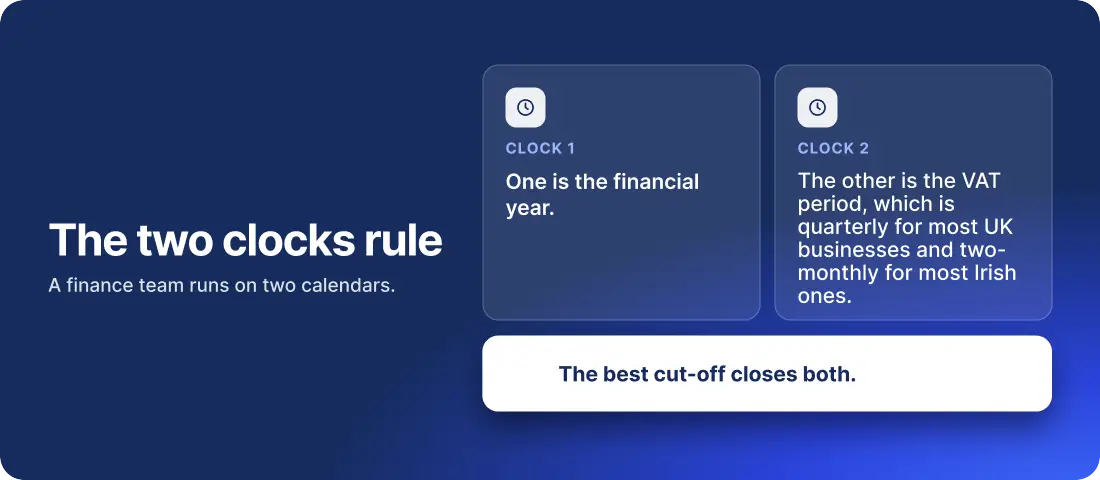
Your cut-off sits between two calendars:
- Financial-year clock: a year-end switch keeps the completed year in the old system and starts the next one in the new system.
- VAT clock: a VAT-period-end switch reduces the need to handle one VAT period across two systems.
| Cut-off | Result |
|---|---|
| Year-end + VAT period-end | Cleanest option: both reporting periods close together. |
| VAT period-end only | VAT stays within a clear period, but the financial year spans two systems. |
| Year-end only | The annual reporting cut-off is clean, but the VAT period spans the change. |
The American Chamber of Commerce Ireland followed the first pattern: AccountsIQ was ready for use on 1 January, the first day of its new financial year.
Choose the date that leaves the fewest reporting loose ends while giving finance enough capacity to manage the change properly.
Can you switch accounting software mid-year?
Yes. A mid-year switch is workable, but you need a clear plan for the transactions already recorded before go-live.
Decide where the earlier months will sit
You can leave the earlier part of the year in your old system and use both systems when preparing the full-year accounts. Or, if your migration supports it, bring those earlier periods into the new system.
For UK companies, the records retained across the year need to support the company’s accounts and financial position.
Whichever route you choose, write down which system holds the final figures for each period and entity. If the change happens close to year-end, agree the approach with your accountant or auditor before go-live.
UK: what if you switch part-way through a VAT period?
Making Tax Digital does not require the complete VAT record to sit in one software product. HMRC allows the electronic account to span several products, provided the required information moves between them using digital links.
Accepted methods include file imports and exports, automated transfers and APIs. Copying and pasting information between software products does not count as a digital link.
So, a mid-period switch could involve moving the relevant VAT data into the new system or retaining parts of the electronic account across digitally linked products.
Ireland: different rules apply
HMRC’s Making Tax Digital rules do not apply to Irish entities. Revenue requires businesses to retain records that support their tax returns and clearly show the accounting process, generally for six years.
If an Irish entity switches during the year, make sure the records held across the old and new systems remain accessible and together support the relevant returns.
For a group containing UK and Irish entities, set the migration treatment for each jurisdiction rather than applying the UK MTD process across the whole group.
💡 This is general guidance, not tax advice. Confirm the treatment for your business against current HMRC or Revenue guidance and with your adviser.
How much history should you move to the new system?
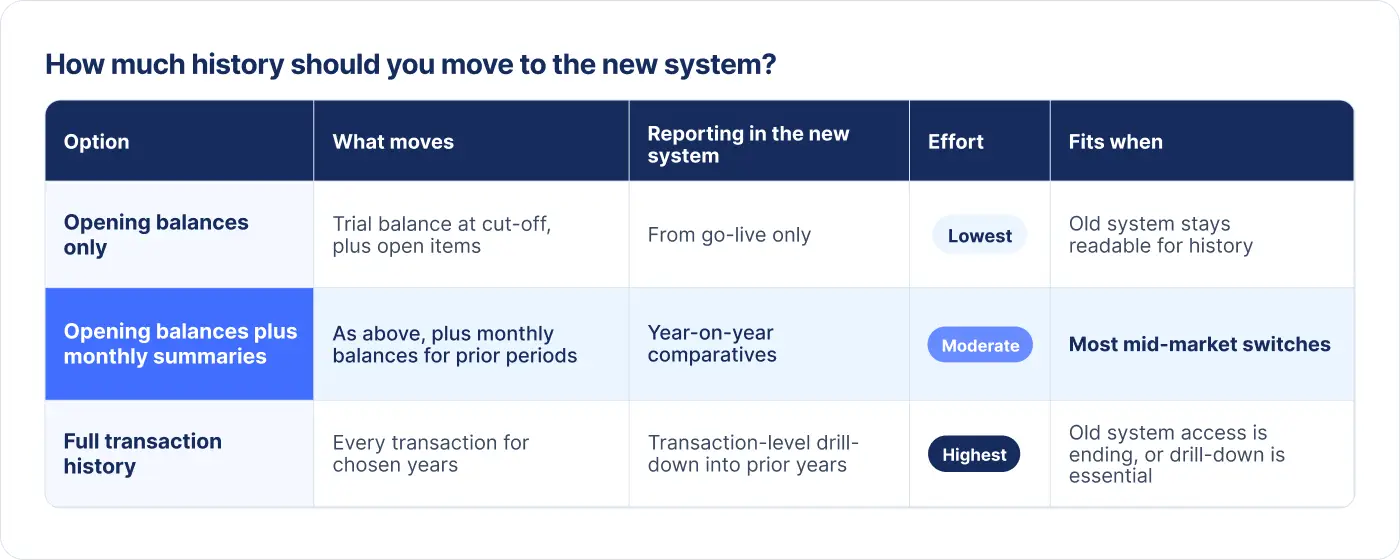
You don’t need to move every historical transaction into your new accounting system. Move enough data for the reporting and analysis you need day to day, while keeping older records accessible where required.
AccountsIQ’s implementation guidance says there’s usually no need to import historical transactions. An opening trial balance and monthly summaries are often enough for comparative reporting.
There are three main approaches:
| Option | What moves | What you can see in the new system | Effort | Best suited to |
|---|---|---|---|---|
| Opening balances only | Trial balance at cut-off, plus open items needed at go-live | Reporting from go-live onwards | Lowest | Businesses that can still access their historical records elsewhere |
| Opening balances + monthly summaries | Opening data plus monthly balances for earlier periods | Prior-period comparisons without every historical transaction | Moderate | Teams that need comparative reporting but rarely drill into old transactions |
| Full transaction history | Individual transactions for the periods selected | Transaction-level detail for earlier periods | Highest | Businesses that regularly need historical drill-down or will lose practical access to the old system |
Work backwards from the reports you actually use
Before deciding to move several years of transactions, ask:
- Do you need transaction-level detail from previous years? If most questions are answered by monthly or annual comparisons, summary balances may be enough.
- How often does finance go back into old transactions? Occasional queries may be easier to handle through an accessible archive.
- Will you still be able to access the old records? If the old system is being switched off completely, you may need a deeper migration or a more detailed independent archive.
Keep what you don’t migrate
Migration scope doesn’t change how long you need to retain records.
| Record | Retention period |
|---|---|
| UK VAT records | At least six years, or 10 years for records covered by the VAT One Stop Shop or former Mini One Stop Shop schemes |
| UK limited company records for tax | Generally six years from the end of the financial year they relate to, with longer periods applying in some circumstances |
| UK Companies Act accounting records | Three years for private companies and six years for public companies from the date the records are made |
For Irish entities, the Revenue retention requirements covered above still apply.
Before access to the old system ends, check that anything you are leaving behind can still be opened, searched and retrieved when finance, auditors or advisers need it.
How do you prepare your data before switching?
Don’t treat migration as a copy-and-paste exercise. Start with what the business needs to report on, then shape the chart of accounts and coding around those requirements.
AccountsIQ recommends working backwards from reporting outputs into the chart of accounts and BI coding structure. Its implementation guidance suggests starting with two or three key reporting dimensions, such as department or location, and adding more where needed.
That could mean using dimensions such as:
- Department
- Location
- Project
Keeping that analysis outside the nominal code structure can make it easier to report across different parts of the business without creating a new ledger code for every combination.
Explore AccountsIQ business intelligence.
Clean the master data before it moves
Work through the data that will underpin day-to-day finance:
- Chart of accounts: map old codes to the new structure, remove dormant codes and resolve duplicates.
- Customers and suppliers: merge duplicate records and check key details such as payment terms. For suppliers, verify bank details using your usual controls.
- VAT and tax codes: map existing codes to the correct treatment in the new system.
- Currencies: confirm which currencies are needed and how exchange rates will be managed.
- Fixed assets: make sure the fixed asset register agrees to the ledger before migration.
- Entities: confirm the legal entities, ownership structure and financial year-ends.
- Users and approvals: decide who needs access, what they should be able to do and which approval limits apply.
Cleaning the data before migration is easier than untangling duplicate records, redundant codes and inconsistent structures once they are already in the new system.
What should you reconcile before the cut-off?
Before you take the final balances from the old system, make sure the accounts behind them can be explained and supported. Otherwise, you risk carrying old differences into the new set-up and investigating them after go-live.
| Area | What to check |
|---|---|
| Bank | Reconcile each account to the bank statement at the cut-off date and identify any outstanding items. |
| Debtors | Agree the sales ledger to the control account and investigate old or unallocated receipts. |
| Creditors | Agree the purchase ledger to the control account and investigate unallocated payments or unexplained differences. |
| Intercompany | Agree both sides of each intercompany balance and investigate any differences before the cut-off. |
| VAT | Agree the VAT control account to the latest return and account for transactions posted since that return. |
| Payroll and tax liabilities | Agree balances to the relevant payroll reports and tax records. |
| Accruals and prepayments | Check that each balance is still valid and supported by the underlying calculation. |
| Suspense and clearing accounts | Clear unexplained items where possible and document anything that remains. |
For each material balance, record who completed the reconciliation, the date and the report or statement it was checked against.
There is often a gap between extracting migration data and going live. Decide in advance how transactions and adjustments dated on or before the cut-off will be handled.
If something changes after the final balances have been extracted, update the migration data or opening position through the agreed cutover process so the closing and opening positions still agree.
How do you switch accounting software across a group of companies?
A group migration adds another test: the individual entities need to work, but so does the group result.
Focus on five decisions.
1. Move together or in phases?
A phased rollout lets you test the group design on a live entity before applying it more widely. Choose a pilot that reflects the transactions, currencies and reporting needs you expect elsewhere.
A group-wide go-live may make more sense where entities trade heavily with each other and splitting them across two systems would create additional intercompany work.
Getech spent three months designing and building its AccountsIQ set-up. That initial subsidiary design then became the template for later entities.
2. Set the group reporting structure
Individual entities may need local accounts, but consolidated reporting needs a consistent group structure.
Agree:
- group reporting categories
- how local accounts map into them
- the reporting currency
- which entities sit in each consolidation group
AccountsIQ allows subsidiaries to use different GL codes provided the relevant GL categories and subcategories align for consolidation.
Explore multi-entity accounting.
3. Design intercompany relationships once
The existing balances should already be reconciled. Now define how intercompany trading will work in the new system: which entities trade together, which debtor and creditor accounts correspond, and how transactions will be matched.
AccountsIQ’s intercompany functionality connects the relevant customer and supplier accounts between trading entities and supports group-level elimination.
4. Agree how the group will handle currencies
Document each entity’s base currency, the group reporting currency and who owns the exchange-rate process.
AccountsIQ can manage exchange rates centrally across a consolidation group, and its consolidation set-up uses period-average rates for profit and loss accounts and period-end rates for balance sheet accounts.
5. Test the group result before go-live
Before the first live reporting cycle, run a trial consolidation and check that:
- each entity’s trial balance is in balance
- local accounts map to the expected group reporting lines
- intercompany balances eliminate as expected
- foreign currency entities translate using the agreed rates
- the consolidated position agrees to the signed-off group position from the old system
Resolve mapping, intercompany and currency issues before they reach the first live group close.
How do you set up opening balances?
Opening balances are more than a trial balance. The general ledger, customer and supplier balances, bank items and supporting registers need to start from the same agreed position.
Load them in layers:
| Step | What to load |
|---|---|
| 1. Trial balance | Load the signed-off trial balance at the cut-off date for each entity. |
| 2. Customer and supplier open items | Bring across the outstanding invoices, credit notes and payments you still need to manage. The totals should agree to the debtor and creditor control accounts in the trial balance. |
| 3. Unreconciled bank items | Bring across outstanding receipts and payments needed for the first bank reconciliation. Don’t add the bank balance again if it is already included in the trial balance. |
| 4. Fixed assets | If the fixed asset register is moving, set up the opening asset position so cost and accumulated depreciation agree to the corresponding ledger balances. |
| 5. Opening stock, if relevant | Bring across the agreed quantity and value of stock held at go-live. |
AccountsIQ recommends importing the trial balance before the opening financial position to reduce differences between the general ledger and the sales and purchase ledgers. Its opening-position importer supports customer and supplier open items, unreconciled bank transactions and opening stock.
Once everything is loaded, run the trial balance and aged debtor and creditor reports. AccountsIQ specifically recommends checking its Trial Balance V Aged Debtors/Creditors Reconciliation report after import.
Fix any differences before normal posting begins, and keep a record of later corrections so finance can trace them back to the signed-off cut-off position.
What happens to bank feeds, integrations, and your HMRC connection?
Before go-live, check every live connection into and out of the accounting system.
- Bank feeds: choose the start date carefully so you don’t import transactions already represented in the opening position. AccountsIQ lets you set the feed’s “synchronise from” date.
- Integrations: test payroll, expenses, billing, CRM and other connected systems. Switch off the old connection when the new one starts to reduce the risk of duplicate postings.
- HMRC: reconnect your Making Tax Digital software and check the authorisation works. HMRC requires compatible software to be authorised to access VAT data.
- Agents: if an accountant or agent files VAT for you, confirm they can still access the software and records they need.
Keep a simple cutover log showing when each old connection stopped, when the new one started and who checked the first successful transaction.
Explore AccountsIQ integrations.
Do you need to run both systems in parallel?
Not usually across the whole finance operation.
Running the same processes in two systems adds work and gives finance another set of numbers to reconcile. AccountsIQ’s own implementation guidance recommends avoiding parallel systems where possible and focusing instead on a controlled cut-off and opening position.
There are cases where a limited parallel run makes sense, particularly for a bespoke or high-risk process that cannot be fully tested another way.
Kefron took that approach. AccountsIQ implemented the core system first while some bespoke processes continued temporarily on Exchequer, then replaced the remaining legacy elements in stages.
Keep the scope narrow and define what needs to happen before the old process can be switched off.
How do you know the switch has worked?
The first month-end close is the clearest test of whether the new set-up works in practice.
Check that:
- Finance can close within the expected timetable without creating new spreadsheets or workarounds.
- The numbers can be explained: movement from the signed-off opening position ties back to transactions posted since go-live.
- Core reconciliations complete normally, with no unexplained differences carried forward.
- Management and group reporting works as designed, including consolidation where relevant.
- Connected systems complete a full cycle correctly, without missing or duplicate postings.
- Users can complete their day-to-day tasks with the intended access and approval permissions.
If something doesn’t look right, narrow it down to the entity, account, date or source process causing the difference. Correct it in the right place, record what changed and run the check again.
After the first close, note anything that slowed the team down (awkward mappings, unnecessary codes, unclear ownership or extra manual steps) and fix it before the next reporting cycle.
Who should run the switch?
One person inside the business should own the switch from start to finish. Everyone else should have a clearly defined role around them.
- Project owner: keeps the plan moving, makes decisions and has authority to resolve issues.
- Finance team: owns the accounting design, data quality, testing and final finance sign-off.
- Software provider or implementation partner: handles system configuration, migration and technical set-up with the finance team.
- Process owners: the people responsible for payroll, expenses, billing, banking and other connected systems test the parts they use.
- Accountant or auditor: involve them where you need input on cut-off, comparatives, audit evidence or record retention.
AccountsIQ’s implementation guidance similarly recommends a dedicated project lead with enough authority and capacity to own the project.
Give each workstream one named owner and one person who approves the result.
Switching to AccountsIQ
If you’re switching because QuickBooks, Xero, or Sage can no longer keep up with the way your finance team works, AccountsIQ is designed for the next stage of complexity.
It brings together:
- Multi-entity accounting and consolidation for groups managing several companies.
- Flexible reporting across entities, departments, locations and other dimensions.
- Connected finance tools, including ExpenseIn, so expense data can feed into the wider accounting process.
The migration matters. AccountsIQ works with customers on the structure, data and set-up needed for go-live, rather than simply lifting the old system into a new one.
Artichoke Trust is one example. After moving from Sage Financials, it completed its AccountsIQ implementation in two days following detailed preparation and testing.
💡 If you’re weighing up your next accounting system, talk to an AccountsIQ specialist about what the switch would involve.
Frequently asked questions about switching accounting software
How long does it take to switch accounting software?
It depends on the number of entities, the complexity of the new design, the integrations involved and how much data you choose to move.
AccountsIQ customer examples show how different projects can be. Artichoke Trust moved from Sage Financials in two days after preparation, while Getech spent three months designing and building a more complex group set-up. Neither should be treated as a standard implementation timeframe.
Ask your provider for a project plan based on your own entities, processes, data and integrations rather than a headline migration time.
Can I cancel my old accounting software straight after switching?
Usually not immediately.
Validate the first close first, then make sure the historical records you need to retain remain complete and accessible. You may not need to keep paying for the old software for the full statutory retention period if you have a usable archive, but check that the exported records meet your accounting, tax and audit requirements before cancelling access.
What is the difference between data migration and implementation?
Data migration is the movement of financial data into the new system: opening balances, open items and any history you decide to bring across.
Implementation is the wider project. It includes reporting design, configuration, user access, integrations, testing, training and the cutover itself.
Migration is one part of implementation.
Will switching accounting software affect our audit?
It can change where your auditor needs to obtain evidence, particularly if the financial year spans two systems.
Tell your auditor about the switch early. Agree the cut-off, which system holds the final figures for each period, how comparatives will be provided and where historical records will remain accessible.
A clear audit trail between the old closing position and the new opening position makes that process much easier.